adding seedance 2.0 and chatgpt images 2.0 to maginary
every AI, one prompt. that’s the whole pitch
two new models just landed in maginary: Seedance 2.0 (ByteDance’s new video model) and GPT-image-2 — the one everyone calls “ChatGPT Images 2.0”. no dropdowns, no app-switching. both live in maginary’s premium pool, so one flag — --flagship — puts them in play, or you name either one directly and skip the pool entirely
small confession: these actually shipped back in june. I didn’t have time to write about it, so consider this the fashionably late launch post
chatgpt images 2.0 (aka gpt-image-2)
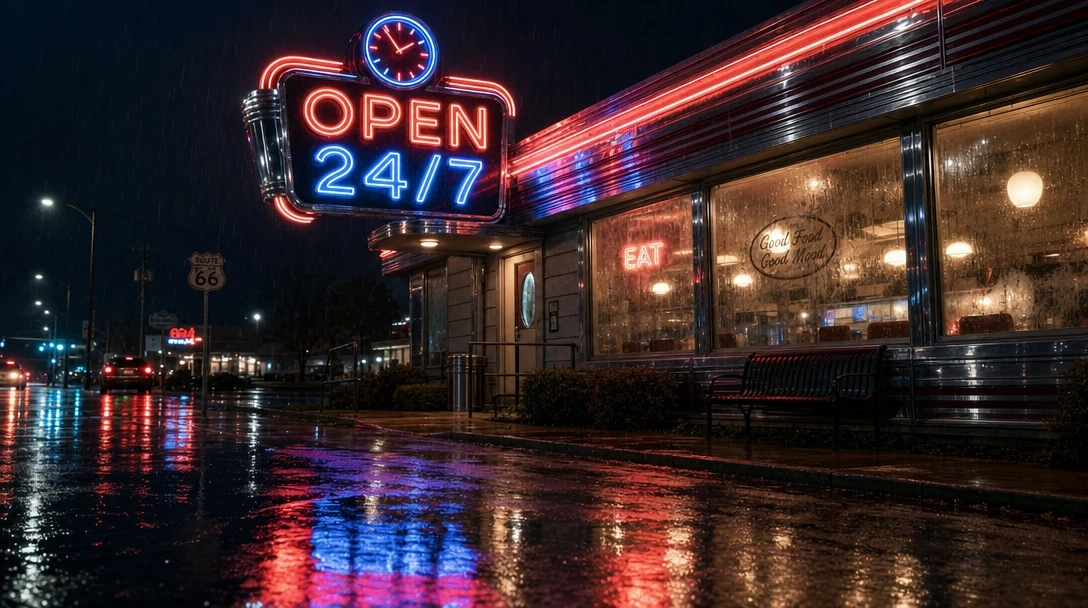
OpenAI’s new image model. the headline feature: it finally renders text. not “text-ish shapes”, actual legible words, on signs, labels, posters
“vintage neon diner sign that says “OPEN 24/7”, chrome details, rainy night reflection --ar 16:9 --gpt2high”
app.maginary.ai/g/d23035098b862fc44078b6ffb1ca3215/2
if you’d use --flagship instead of specifyignthe model — it opts this generation into maginary’s whole premium image pool, which today is GPT-image-2 (high) and Nano Banana Pro. any of them may run, and for a 4-image grid maginary usually blends the two — so this one prompt comes back as a side-by-side: a couple of GPT-image-2 frames next to a couple of Nano Banana Pro. you just keep the best one
that’s the actual value of not naming a model: one prompt, a built-in shootout between the top models, and no homework on which one wins for this shot. want GPT-image-2 and nothing else? name it: --gpt2high (like we did here)
it comes in two quality tiers, and both do image editing too (drop an image url in the prompt and describe the change):
--gpt2— medium quality, fast and cheap, great default--gpt2high— high quality, slower and pricier, for finals — this is the tier that rides in the--flagshippool
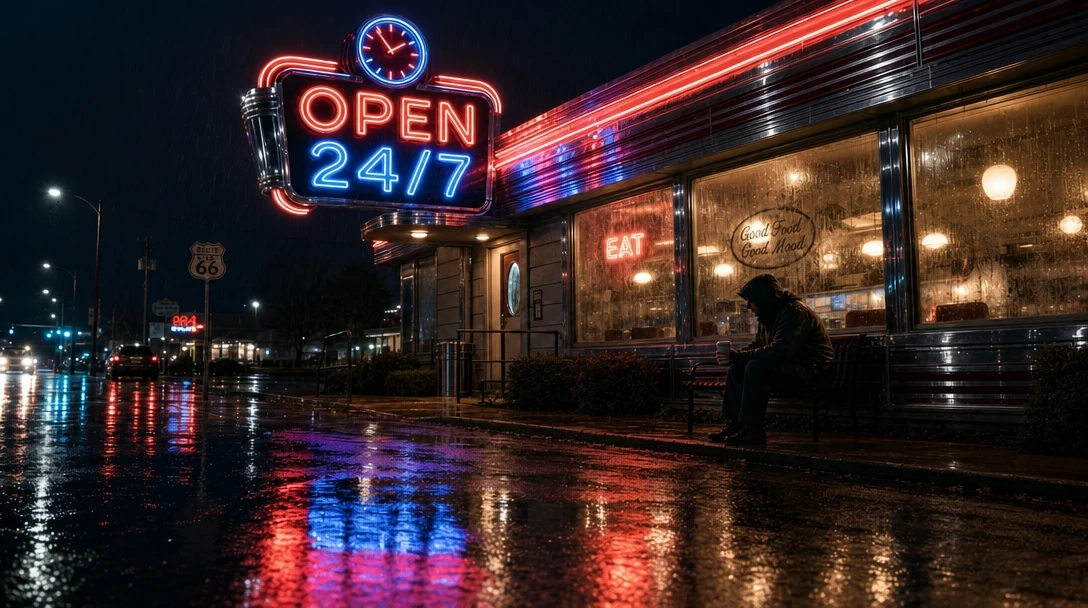
now let’s test its editing capabilities
”https://s.maginary.ai/u/e6c2e62817b8c17334784e9b0d306c74.webp --gpt2high add a person on the bench --2”
app.maginary.ai/g/590d664a67be989f2b1e12b4ca095ce4/0
seedance 2.0
now the fun part. hover the finished sign, hit the ▶ button, and type into the exact same prompt bar:
”https://s.maginary.ai/u/cefdb7a3e8153b074664b50ee3f254ed.webp --seedance2pro slow dolly in, neon flickers, rain intensifies, man stands up and enters the diner furiously --5sec --720p --1”
[app.maginary.ai/g/d51b5b42c873a66a861a8cd941994f52](https://app.maginary.ai/g/d51b5b42c873a66a861a8cd941994f52/)
same flag, different pool. on a video, --flagship puts the premium video models in the running — Seedance 2 Pro and Sora 2 Pro — and since a clip is a single output, maginary picks one of them for it. either is fair game; you don’t have to know which exists. here we’ve used --seedance2pro (or --seedance2 for the faster, cheaper tier)
what Seedance 2 brings:
- native audio + lipsync, included at no extra cost (ambient, sfx, speech — on by default)
- 4 to 15 second clips, any length in between, not fixed steps
- up to 1080p on the pro tier
- text-to-video, image-to-video, and reference-to-video — feed it multiple reference images and it keeps the subject consistent (this one maginary picks automatically whenever you give it several input images for a video)
- two tiers:
--seedance2(fast, capped at 720p, ~20% cheaper) and--seedance2pro(full quality)
one flag to rule the flagships
this is the part I care about most. every model launch adds cognitive load: new name, new pricing, new UI, new discord. maginary’s answer is three lanes, zero menus:
- plain prompt → maginary picks (and, across a 4-image grid, mixes) from the everyday pool. these are the fast, affordable models we curate and swap as better ones ship, so you’re never learning — or re-learning — a 30-name menu. you just get a good result, cheap and fast, without having to choose
--flagship→ opts this generation into the premium pool (images: GPT-image-2 high + Nano Banana Pro; video: Seedance 2 Pro + Sora 2 Pro). any model in the pool may be selected — for an image grid maginary usually blends them into a side-by-side, for a single video it picks one. premium models cost premium credits, which is exactly why the pool is opt-in and never draining you in the background- model by name (for the flagships only) → full control. pin exactly one model — no picking, no mixing. every model has its own trigger, so when you want a specific one, you say so:
| you want | type |
|---|---|
| GPT-image-2 (medium) | --gpt2 |
| GPT-image-2 (high) | --gpt2high |
| Nano Banana Pro | --nanobananapro |
| Seedance 2 Fast | --seedance2 |
| Seedance 2 Pro | --seedance2pro |
| Sora 2 Pro | --sora2pro |
| let maginary choose from the premium pool | --flagship |
full list in the docs, and the full breakdown of the three lanes in how maginary picks your model
deeper dives
if you’re weighing these models against the competition:
- Seedance 2.0 vs Sora 2 — audio-native workhorse vs OpenAI’s premium video model
- Nano Banana Pro vs ChatGPT Images 2.0 — Google vs OpenAI on images
what’s next
I want maginary to be the google of image generation. what openrouter did for text models, maginary does for images and video — every model behind one prompt, all the complexity abstracted away.
maginary started as a tool for anyone. but nothing stops you from pointing it at your agent. say you want your chatbot to suddenly have god-like image generation, editing, and video — you just call maginary’s api and there it is. no guessing which model to use, no memorizing its parameters. you describe the shot; maginary picks the model (the same three lanes as the UI: plain prompt, --flagship, or a model by name).
and you can check the exact cost of a prompt before you ever spend a credit: POST /api/credit-check/ returns the price up front (see the api reference). no surprise bills — for you, or for your users.
you can’t really talk about agents without MCPs, and yes, maginary has one. I’ll announce that separately, together with agentic payments.
create: app.maginary.ai
follow my progress: @xucian_